Search This Blog

Showing posts with label General. Show all posts

Wednesday, October 31, 2007

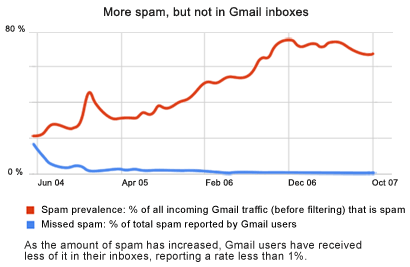
Dont mess with Google,They Google-ised spam!

I m pretty sure that most of us hold more than 2 email accounts by now.Being a Gmail user since its inception.I couldnt help but notice the low amounts of spam that get into my Gmail inbox.Comparing it my Gmail to my other accounts like H**mail and Y*hoo,the differences are vast to say the least.Now I m not on a Google-competitor bashing spree here but really? ,just look at the spam themselves.The ones that managed to make it through Google are pure gibberish,Google has successfully forced spam to the point of illegibility.

Here's the news from Google.

Gmail fans often cite great spam protection as a key reason they love Gmail. It's relatively easy to catch spam messages; the challenge is to catch the right messages without blocking mail you want along the way.How do we do it? Our team of leading spam-fighting scientists uses a number of advanced Google technologies. Though in many cases our best weapon is you.
Community clicks
Gmail users play an important role in keeping spammy messages out of millions of inboxes. When the Gmail community votes with their clicks to report a particular email as spam, our system quickly learns to start blocking similar messages. The more spam the community marks, the smarter our system becomes.

Source http://www.google.com/mail/help/fightspam/spamexplained.html

Tuesday, October 16, 2007

System Restore

For some, System Restore is truly a lifesaver.Ever so often, users inadvertently install programs that seem benign on the surface but end up making a complete mess of their computer system. System Restore resolves this problem by allowing your computer to "roll-back" to the select Restore date. This means that any software or changes done to the computer after this date, would be undone.
To manually create a restore point, click on the System Protection, make sure that you have enough of space. In the System Protection tab, click on the Create button, you will need to fill in a description of this restore point to help you identify it.
Launch System Restore by going to Start menu -> All Programs -> Accessories -> System Tools -> System Restore. You may choose a point yourself or allow System Restore to do it for you. After selecting it, reboot your computer. Now your computer has a restore point to roll-back to in case something goes wrong.

Windows Activation

Every new copy of Windows comes with an Activation requirement.Its embedded in the operating system ,forming the tip of Microsoft's battle against software pirates.It will give you 30 days from installation and/or start up to activate before systematically shutting down various parts of the operating system.Of course safest and logical thing to do would be to activate it but for whatever reason ,you decide not to and your system gets blocked, you still could access your files by going into Safe Mode at system start up.Safe Mode would start your computer up by using minimal amounts of resources and drivers.Its primarily used for troubleshooting and testing purposes.Once you have secured your files ,ring up those "nice" folks at Redmond and ....you know........ACTIVATE IT !!!!!!!!!